模组安装程序创建指南
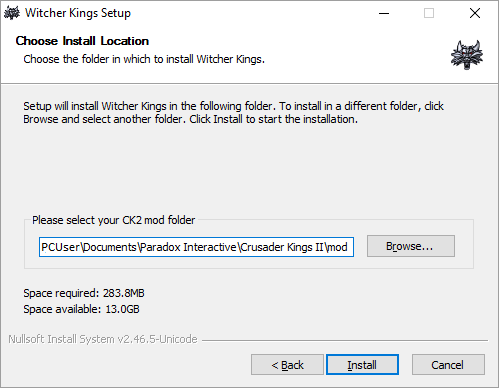
Installation folder step with Witcher Kings installer
本指南将解释如何为CK2创建Windows .exe安装程序 mod, with NSIS.
安装程序可以防止模组失效的最常见原因,减少所需的支持:
- forgetting to remove previous mod version
- unzipping in wrong folder
- black flags due to an outdated gfx cache
But it may have some drawbacks:
- .exe files may cause false positive with some antivirus
- .exe files may be restricted to upload (ex: forum)
Steps
- Install NSIS-2.46.5-Unicode
- 在与 .mod 文件相同的文件夹里创建一个 setup.nsi 文件(参见 #Sample script)
- Right-click and select Compile NSIS Unicode script
- Rename the .exe with version number, if needed.
Sample script
This script is based on When The World Stopped Making Sense setup.nsi script, replacing the mod name by MyMod.
Comments start with ; character.
Note that ;!insertmacro MUI_PAGE_COMPONENTS 可能未注释以显示中间页面,让用户选择安装模块。同样的行为也可以通过安装所有内容,并让玩家选择在启动器中激活的子模组来实现。
; Simple CK2 mod manual installer for Windows

; To generate the installer, download NSIS Unicode 2.46.5 from https://code.google.com/p/unsis/downloads/list
; and launch "Compile NSIS Unicode script" from context menu.
; Unicode is needed to support French accents.
; NSIS documentation:
; - MUI: http://nsis.sourceforge.net/Docs/Modern%20UI/Readme.html
; - Scripting reference: http://nsis.sourceforge.net/Docs/Chapter4.html

!include "MUI2.nsh"

; Mod configuration defined in .mod file, to know which folders to cleanup.
!define mod_path "MyMod"
!define mod_user_dir "MyMod"

; The name of the installer
Name "MyMod"

; The file to write
OutFile "MyMod-setup.exe"

; The default installation directory
InstallDir "$DOCUMENTS\Paradox Interactive\Crusader Kings II\mod"

; Request application privileges for Windows Vista
RequestExecutionLevel user

; ---------------------------
; Interface settings (optional)
; ---------------------------

!define MUI_ICON "MyMod.ico"
; Bitmap for the Welcome page and the Finish page (164x314 pixels)
!define MUI_WELCOMEFINISHPAGE_BITMAP "MyMod.bmp"
!define MUI_WELCOMEFINISHPAGE_BITMAP_NOSTRETCH

; ---------------------------
; Pages: Language -> Welcome -> Directory -> Install -> Finish
; ---------------------------

!define MUI_WELCOMEPAGE_TITLE $(MUI_WELCOMEPAGE_TITLE)
!define MUI_WELCOMEPAGE_TITLE_3LINES
!define MUI_WELCOMEPAGE_TEXT $(MUI_WELCOMEPAGE_TEXT)
!insertmacro MUI_PAGE_WELCOME

; To simplify, do not display components page: all are installed
;!insertmacro MUI_PAGE_COMPONENTS

!define MUI_DIRECTORYPAGE_TEXT_DESTINATION $(MUI_DIRECTORYPAGE_TEXT_DESTINATION)
!insertmacro MUI_PAGE_DIRECTORY

!insertmacro MUI_PAGE_INSTFILES

!define MUI_FINISHPAGE_NOAUTOCLOSE
!define MUI_FINISHPAGE_TITLE $(MUI_FINISHPAGE_TITLE)
!define MUI_FINISHPAGE_TEXT $(MUI_FINISHPAGE_TEXT)
!define MUI_FINISHPAGE_TEXT_LARGE
!define MUI_FINISHPAGE_SHOWREADME "$INSTDIR\ChangeLog.txt"
;!define MUI_FINISHPAGE_SHOWREADME_NOTCHECKED
!define MUI_FINISHPAGE_SHOWREADME_TEXT $(MUI_FINISHPAGE_SHOWREADME_TEXT)
!define MUI_FINISHPAGE_LINK $(MUI_FINISHPAGE_LINK)
!define MUI_FINISHPAGE_LINK_LOCATION "http://MyModPage"
!define MUI_FINISHPAGE_NOREBOOTSUPPORT
!insertmacro MUI_PAGE_FINISH

;Languages - needs to be after page declarations
!insertmacro MUI_LANGUAGE English ;First language is the default if a better match is not found
!insertmacro MUI_LANGUAGE French

; Display Language selection dialog
Function .onInit

  !insertmacro MUI_LANGDLL_DISPLAY

FunctionEnd

; Un-install main mod
Section "Uninstall previous"

  ; Remove directories and files recursively
  ; Only delete <path> folder of main mod, in case some files are removed from folders
  ; .mod files and other sub-mod files will always get overwritten during install.
  RMDir /r "$INSTDIR\${mod_path}"

SectionEnd

; Clean gfx cache
Section "Clean gfx cache"

  ; Delete <user_dir>/gfx folder
  RMDir /r "$INSTDIR\..\${mod_user_dir}\gfx"

SectionEnd

;--------------------------------

; Install mod and sub-mods
Section "Install"

  ; Set output path to the installation directory.
  SetOutPath "$INSTDIR"

  ; Copy mod files (excluding configuration files)
  File "ChangeLog.txt" ; Copy changelog to open it after installation
  File "*.mod" ; Copy all .mod descriptors
  File /r /x "*.exe" "${mod_path}*" ; Note: sub-mod paths start with same as main mod path

SectionEnd

; ---------------------------
; Localization
; ---------------------------

; English
LangString MUI_WELCOMEPAGE_TITLE ${LANG_ENGLISH} "MyMod$"
LangString MUI_WELCOMEPAGE_TEXT ${LANG_ENGLISH} "This installer will:$\r$\n \
1) Remove any previously installed version of the mod$\r$\n \
2) Clean the mod gfx cache$\r$\n \
3) Install the mod to your mod folder$\r$\n"
LangString MUI_DIRECTORYPAGE_TEXT_DESTINATION ${LANG_ENGLISH} "Please select your CK2 mod folder"
LangString MUI_FINISHPAGE_TITLE ${LANG_ENGLISH} "MyMod has been installed"
LangString MUI_FINISHPAGE_TEXT ${LANG_ENGLISH} "To play:$\r$\n \
- Open CK2 launcher.$\r$\n \
- Select the mod 'MyMod' in the Mod tab of the launcher.$\r$\n \
- Enjoy !$\r$\n"
LangString MUI_FINISHPAGE_SHOWREADME_TEXT ${LANG_ENGLISH} "Open the Changelog"
LangString MUI_FINISHPAGE_LINK ${LANG_ENGLISH} "Go to MyMod forum"

; French
LangString MUI_WELCOMEPAGE_TITLE ${LANG_FRENCH} "MyMod"
LangString MUI_WELCOMEPAGE_TEXT ${LANG_FRENCH} "Cet installateur va:$\r$\n \
1) Supprimer toute ancienne version du mod precédement installée$\r$\n \
2) Vider votre cache de gfx du mod$\r$\n \
3) Installer le mod dans votre répertoire de mods$\r$\n"
LangString MUI_DIRECTORYPAGE_TEXT_DESTINATION ${LANG_FRENCH} "Merci de sélectionner votre répertoire de mods CK2"
LangString MUI_FINISHPAGE_TITLE ${LANG_FRENCH} "MyMod a été installé"
LangString MUI_FINISHPAGE_TEXT ${LANG_FRENCH} "Pour jouer:$\r$\n \
- Lancez CK2.$\r$\n \
- Sélectionnez le mod 'MyMod' dans la section Mod.$\r$\n \
- Sélectionnez UNIQUEMENT les sous-mods graphiques pour MyMod pour lesquels vous possédez les DLCs requis.$\r$\n \
- Profitez !$\r$\n"
LangString MUI_FINISHPAGE_SHOWREADME_TEXT ${LANG_FRENCH} "Ouvrir le Changelog (en anglais)"
LangString MUI_FINISHPAGE_LINK ${LANG_FRENCH} "Accéder au forum MyMod"
External links
相关页面 (14)
ModPatch 2.4 mod compatibility guidePatch 2.5 mod compatibility guidePatch 2.6 mod compatibility guidePatch 2.7 mod compatibility guidePatch 2.8 mod compatibility guidePatch 3.0 mod compatibility guidePatch 3.1 mod compatibility guideWhen The World Stopped Making SenseWitcher Kings创建模组合并指南彻底转换指南游戏存档兼容性