小地图模组制作
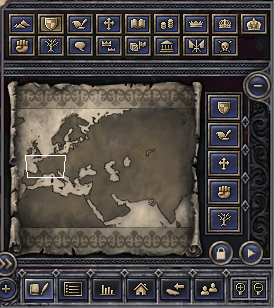
你可以修改小地图以及周围的所有按钮。如果你的自定义地图大小和原版地图不一样,导致小地图形状也不同,那你可能需要做一些小地图模组。
minimap_area.dds
这个文件位于Crusader王II\gfx\interface中,就是你右下角看到的图片。自己动手做吧。还有另外三个相关文件:
- minimap_area_bg.dds - 这个位置在小地图图像后面。你可以让图片完全透明,然后忽略它。否则可能会妨碍你。
- minimap_bg——这是当你隐藏地图模式按钮时,出现在小地图周围的背景(“窗口”)。如果你修改了小地图菜单,使得无法隐藏地图模式按钮,那么你可以忽略这个文件。
- minimap_bg_big - this is the background you usually see.
main.gui
位于Crusader王II\interface中,这是放置小地图及其周围所有内容的相关文件。把整个文件复制到你的模组目录。在你复制的文件最顶部,你会看到以下代码:
iconType = {

	name ="minimap_pic"

	spriteType = "GFX_minimap_area"

	position = { x=-259 y=-199 }

	Orientation = "LOWER_RIGHT"

}


# TODO: we should use a button instead for minimap...

# or its own type, this is a ahck to deal with transparency

# in the minimap icon

positionType = {

	name = "minimap_size"

	position = { x=183 y=120 }

}
图标类型块根本无关紧要!游戏会忽略任何更改,但这并不意味着移除它们是明智的选择。就让它顺其自然吧。
不过positionType块会影响你的视框。如果你把位置调整成与自定义小地图图像大小相匹配,那么视野框就能在小地图的各个位置移动。如果你的图像是183×180,它会是:
position = { x=183 y=180 }
完成后,实际的界面改装工作就会出现。首先往下滚动到这一部分:
########################################

########    MINIMAP AREA   #############

########################################


windowType = {

	name = "minimap"

	backGround =""

	position = { x=-280 y=-248 }

	size = { x=256 y=125 }

	moveable = 0

	dontRender = ""

	horizontalBorder = ""

	verticalBorder = ""

	fullScreen = no

	Orientation = "LOWER_RIGHT"
小地图窗口的工作方式是,minimap_area.dds图像周围的一切都会根据该图像移动。所以如果你用的是方形小地图而不是原版矩形小地图,并且想把小地图稍微往上移,使其能融入背景框架,那么其他部分也都需要重新排列。
首先,调整尺寸以匹配你的图片。例如,我的图片是183乘180,所以我现在有:
size = { x=183 y=180 }
你可以通过改变位置来移动小地图图像本身。我的183×180图片需要往前移动30像素。因此,新的 y 是 -248 - 30 = -278, which results in the following line:
position = { x=-280 y=-278 }
但如果你加载游戏,小地图周围的一切都会乱晒大弹!除了背景图(如果地图模式按钮隐藏时也是背景图像),还有三个按钮、五个自定义地图模式按钮和一个包含所有普通地图模式按钮的窗口。它们的代码大致如下:
iconType = {

	name = "minimap_bg_big"

	spriteType = "GFX_minimap_bg_big"

	position = { x=0 y=-38 }

	Orientation = "UPPER_LEFT"

}
调整这个图标类型以及其他图标的位置,以匹配你的新地图位置。三个按钮(toggle_mapmodes、minimap_lock和minimap_toggle)可以通过移开它们来“移除”。如果你想禁用地图模式按钮的隐藏功能,可以简单地设置按钮的位置在屏幕外,使用某个巨大的x或y值:
guiButtonType =

{

	name = "toggle_mapmodes"

	position = { x = 3000 y = -100 }

	quadTextureSprite ="GFX_minimap_toggle_mapmodes"

	Orientation = "LOWER_RIGHT"

	pdx_tooltip = "SHOW_MAPMODES_TOGGLE"

}
你也可以用自定义地图模式按钮来做同样的操作。
最后,常规的地图模式按钮本身位于一个windowType块内。如果你想保持原版布局(两条水平按钮线),你只需改变窗口Type的位置,就能移动所有按钮。如果你想更改布局(例如,改成两条垂直线),必须调整各个按钮的位置。
完成这些后,你的小地图和周围按钮就准备好了!
See also
- Interface modding
- Map modding, for making custom maps
| 历史 | 角色 • 家族 • 省份 • 头衔 • 剧本 |
| 脚本 | 指令 • 条件 • 作用域 • 修正 • 事件 • 决议 |
| 常规 | 定义 • 游戏规则 • 另类开局 • 宗教 • 文化 • 政体 • 特质 • 血脉 • 科技 • 法律 • 建筑 • 宣战理由 • 朝贡国 • 单位 • 目标 • 疾病 • 死亡 • 荣誉头衔 • 社团 • 宝物 • 地图外政权 • 内阁成员 • 贸易路线 • 继承 • 奇观 • 称号 |
| 图像/音效/本地化 | 地图 • 图形 • 盾徽 • 肖像 • 界面 • 小地图 • 音乐 • 本地化 |
| 其他 | 故障排除 • 验证器 • 控制台指令 • 编辑游戏存档 • Steam创意工坊 • EU4转档器模组制作 |
相关页面 (55)
EU4转档器模组制作Interface moddingMap moddingSteam创意工坊事件模组制作作用域修正内阁成员模组制作决议模组制作剧本模组制作单位模组制作历史模组制作另类开局模组制作图形模组制作地图外政权模组制作地图模组制作头衔模组制作奇观模组制作宗教模组制作定义宝物模组制作宣战理由模组制作家族模组制作建筑模组制作指令控制台指令政体模组制作故障排除文化模组制作朝贡国类型模组制作本地化条件模组制作死亡模组制作法律模组制作游戏规则模组制作特质模组制作界面模组制作疾病模组制作目标模组制作盾徽模组制作省份模组制作社团模组制作科技模组制作称号模组制作继承模组制作编辑游戏存档肖像模组制作脚本荣誉头衔模组制作血脉模组制作角色模组制作贸易路线模组制作音乐模组制作验证器