验证器
快照时间:2023-09-14 · 原始链接 · Wayback
| 验证器
|
|
|
|
|
|
|
|
| 类型
|
Tool
|
| 作者
|
Jamie550
|
| 版本
|
Released - v1.32.2 for CK2 3.2.1
|
| 论坛/贴吧
|
Link
|
|
|
|
|
|
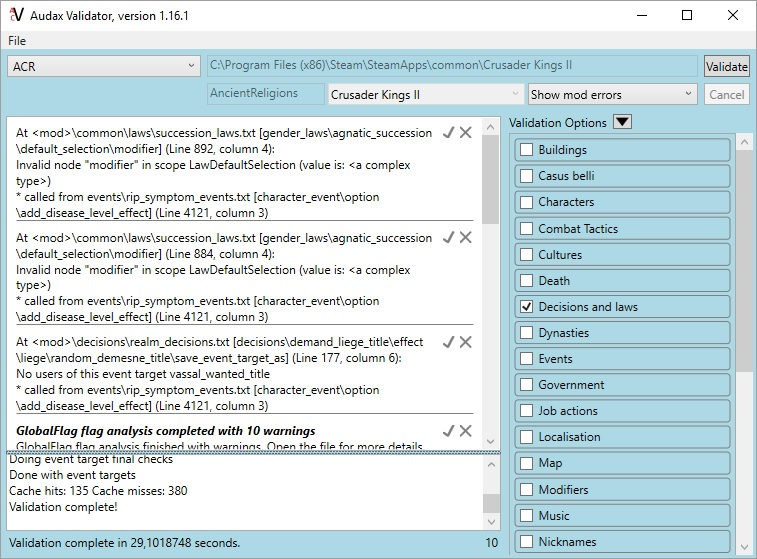
The Validator in action
The Validator 是Windows上的一个实用工具,可以查找游戏文件中的各种错误。它发现了许多bug,无论是在原版还是模组中。
有时候,这几乎是找到随机崩溃或奇怪引擎bug源头的唯一方法。
验证器定期更新,误报数量不断减少。如果验证器报告了一个你认为不是错误的错误,首先确认它确实能正常工作,然后向 forum threadJamie550 会尽快进行必要的修正。同样地,如果你发现验证者没发现的漏洞,导致你花费了一些时间,也请报告!
Features
- 检查基本语法是否正确,并发现括号问题。
- Advanced checking of scopes, triggers, and effects syntax and validity.
- 检查建筑、casus belli、角色、疾病、王朝等等。
- 检测拼写错误、无效或重复的身份证以及各种错别字。
- Detect missing flags.
- Warn on missing localizations.
- ...
Versions
Setup
Create a new scheme for your mod:
- Game Path: location of CK2game.exe. For instance: C:\Program Files (x86)\Steam\SteamApps\common\Crusader Kings II. To find it in Steam, right-click on Crusader Kings II 在游戏库中,进入“本地文件”标签,点击“浏览本地文件”,然后从资源管理器窗口复制路径。
- Mod name: 这是里面模组的文件夹名 ~\Documents\Paradox Interactive\Crusader Kings II\mod\. For instance with ~\Documents\Paradox Interactive\Crusader Kings II\mod\MyMod\, mod name would be MyMod.
- Select "Crusader Kings 2" in the dropdown.
可以配置用于双击问题时打开文件的外部编辑器。
下 Files/Options:
- Path (for Notepad++ this may be C:\Program Files (x86)\Notepad++\notepad++.exe)
- Command line 跳转到故障行的选项(Notepad++ 中:{0} -n{1})
See also
- DidYouKnow.pdf in Validator directory, for advanced features.
相关页面 (63)
EU4转档器模组制作EffectsPatch 2.4.5Patch 2.5.XPatch 2.6.XPatch 2.7.1Patch 2.7.2Patch 2.8.XPatch 3.1.XScopesSteam创意工坊Triggers事件模组制作作用域修正内阁成员模组制作决议模组制作剧本模组制作单位模组制作历史模组制作另类开局模组制作图形模组制作地图外政权模组制作地图模组制作头衔模组制作奇观模组制作宗教模组制作定义宝物模组制作宣战理由模组制作家族模组制作小地图模组制作建筑模组制作指令控制台指令政体模组制作故障排除文化模组制作朝贡国类型模组制作本地化条件模组制作死亡模组制作法律模组制作游戏规则模组制作特质模组制作界面模组制作疾病模组制作目标模组制作盾徽模组制作省份模组制作社团模组制作科技模组制作称号模组制作继承模组制作编辑游戏存档肖像模组制作脚本荣誉头衔模组制作血脉模组制作