Portrait Builder
| Portrait Builder | |
|---|---|
| LOGO | |

| |
| 类型 | Tool |
| 作者 | Measter & Romulien |
| 版本 | 2.5.0 for CK2 2.8.x |
| 论坛/贴吧 | Link |
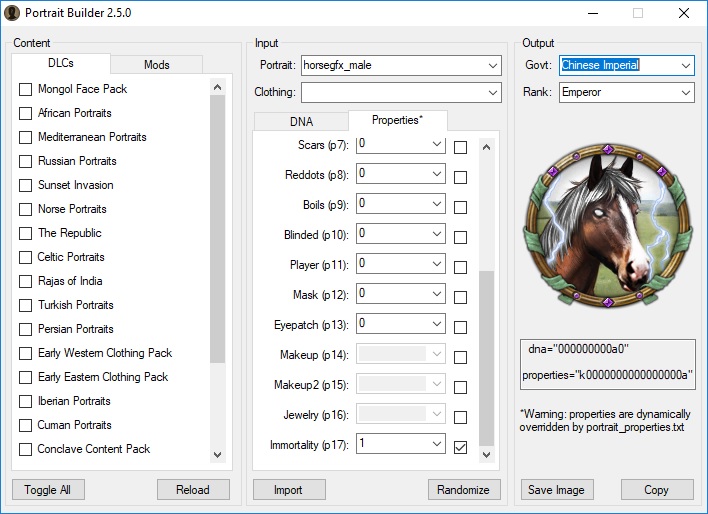
Portrait Builder in action
Portrait Builder 是Windows上的一款实用工具,允许通过根据角色的DNA和属性预览角色的外观来创建自定义角色。
It can be used for character modding, portrait modding or save-game editing.
该工具最初由 Measter 于 2012 年创建,开发停止后,该工具开源。
It was updated in 2016 by Romulien to make it compatible with latest vanilla patch.
Features
- Read portraits from vanilla, DLC zip archives, or mods
- 基于肖像类型(族裔、性别、年龄、年份)、DNA、属性、军衔和政府单位的人物肖像预览。
- 商人共和国和宗教特殊服装框架通过政府下拉菜单支持。
- 社会服装覆盖通过可选下拉菜单支持,以替换文化索引图层(c0->c7)所用的精灵
- 编辑时自动监控加载的模组文件的修改情况,自动重新加载模组数据并刷新当前肖像
- Randomize values for selected characteristics
- Save current character portrait as png image
- Import/export DNA and properties strings
- 禁用选定肖像类型未使用的特征,或只有一帧的特征。
- 通过Steam目录里的userdir.txt文件(如果有的话)读取用户模组文件夹的位置。
Things which are not currently supported include:
- Linux/Mac 平台(由于 DDS 映像库,无法与 Mono 进行交叉编译)
- Load order change via
dependencies在.mod文件中:加载顺序是原版 -> DLC(按字母顺序)->个模组(按字母顺序) - Dynamic government parsing (it uses hardcoded vanilla governments)
Installation
- 请从专用平台下载最新版本的工具 CK2 forum thread and unzip it somewhere.
- Install .NET 4.5, if not already present.
- Start PortraitBuilder.exe
- Select the location of your CK2game.exe (for instance:
C:\Program Files (x86)\Steam\SteamApps\common\Crusader Kings II\CK2game.exe).注意:你可以在Steam上通过库中右键点击游戏,然后选择属性/本地文件/浏览本地文件来获取位置 - 等20-30秒让DLC解压,然后界面才会出现
Troubleshooting
In case of issue:
- 检查PortraitBuilder.exe旁边的log.txt文件:它会报告崩溃异常、解析竖像数据错误、资源损坏等。
- 在PortraitBuilder.exe启动选项中添加 -logfull 会将日志级别设置为 DEBUG。
模组制作
| 历史 | 角色 • 家族 • 省份 • 头衔 • 剧本 |
| 脚本 | 指令 • 条件 • 作用域 • 修正 • 事件 • 决议 |
| 常规 | 定义 • 游戏规则 • 另类开局 • 宗教 • 文化 • 政体 • 特质 • 血脉 • 科技 • 法律 • 建筑 • 宣战理由 • 朝贡国 • 单位 • 目标 • 疾病 • 死亡 • 荣誉头衔 • 社团 • 宝物 • 地图外政权 • 内阁成员 • 贸易路线 • 继承 • 奇观 • 称号 |
| 图像/音效/本地化 | 地图 • 图形 • 盾徽 • 肖像 • 界面 • 小地图 • 音乐 • 本地化 |
| 其他 | 故障排除 • 验证器 • 控制台指令 • 编辑游戏存档 • Steam创意工坊 • EU4转档器模组制作 |
相关页面 (59)
Character moddingDNAEU4转档器模组制作Load orderPortrait moddingSave-game editingSteam创意工坊事件模组制作作用域修正内阁成员模组制作决议模组制作剧本模组制作单位模组制作历史模组制作另类开局模组制作图形模组制作地图外政权模组制作地图模组制作头衔模组制作奇观模组制作宗教模组制作定义宝物模组制作宣战理由模组制作家族模组制作小地图模组制作建筑模组制作指令控制台指令政体模组制作故障排除文化模组制作朝贡国类型模组制作本地化条件模组制作死亡模组制作法律模组制作游戏规则模组制作特质模组制作界面模组制作疾病模组制作目标模组制作盾徽模组制作省份模组制作社团模组制作科技模组制作称号模组制作继承模组制作编辑游戏存档肖像模组制作脚本荣誉头衔模组制作血脉模组制作角色模组制作贸易路线模组制作音乐模组制作验证器