肖像模组制作
 |
"Modding rules[1] 声明DLC资产不应通过模组向未拥有该DLC的用户开放。因此,DLC资源可以在自定义的portraits*.gfx文件中引用,这样DLC必须才能使用该模组。但精灵本身不能直接添加到模组中。” |
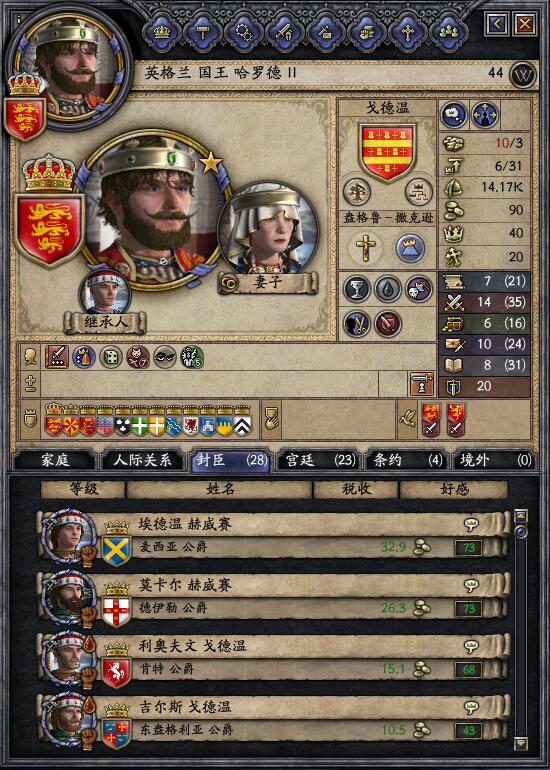
肖像通过叠加多层基本元素构建:背景、通用头部、面部元素(脸颊、头发、鼻子等)、服装、头饰等。
这些基本元素都有多种变体或框架。
The choice of frame is either based on:
儿童是个例外,因为他们是用单一图像创造的,因此孩子看起来很相似。
Characteristics
有两种特征:DNA和性质。两者都是字母串(性质可能是零)。游戏内可以通过控制台命令看到它们 charinfo.
DNA
DNA是一串由父母继承的11个字母,出生后不会改变。
对于历史人物,他们的DNA链可以被设定在 character history:
125501 = {

	name="Temujin" # AKA: Genghis Khan

	dynasty=11100

	dna="bfimkolbecc"

	(...)

}
否则,随机生成的角色会获得随机DNA字符串,这些字符串会在游戏存档中保留。
| Index | Used for |
|---|---|
| d0 | Neck |
| d1 | Chin |
| d2 | Mouth |
| d3 | Nose |
| d4 | Cheeks |
| d5 | Unused |
| d6 | Eyes |
| d7 | Ears |
| d8 | Hair Color |
| d9 | Eye Color |
| d10 | Unused |
So Genghis Khan's dna = "bfimkolbecc" means:
- Frame b for the neck (2nd frame in mongol_male_neck_1.dds)
- Frame f for the chin (6th frame in mongol_male_chin_1.dds)
- Frame i for the mouth (9th frame in mongol_male_mouth_1.dds)
- Frame m for the nose (13th frame in mongol_male_nose_1.dds)
- etc...
如果字母索引的帧数少于字母索引,则会环绕。例如,龙骨通常有4个框架,所以a = 第一帧,e = 第一帧。
Properties
属性是一串最多14个字母的字符串(原版中)。如果字符串较短,末端会加上零。
只有头发(P1)和胡须(P4)可以通过 Customization Pack, the other property values are derived from portrait_properties.txt file.
- p0: Background
- p1: Hair
- p2: Base Head
- p3: Clothes
- p4: Beard
- p5: Headgear
- p6: Imprisoned
- p7: Scars tier I
- p8: Red Dots
- p9: Boils
- p10: Blinded
- p11: Player
- p12: Mask
- p13: Eyepatch
- p14: Chinese makeup
- p15: Chinese makeup 2
- p16: Chinese empress jewelry
- p17: Immortality
- p18: Special crowns behind
- p19: Special crowns
- p20: Freckles
- p21: Physique
- p22: Pale
- p23: Black eye
- p24: Harelip
- p25: Scars tier II
- p26: Scars tier III
- p27: Blood splatter
- p28: Tattoos
- p29: Warpaint
- p30: Demon Child
- p31: Frankish culture male overlayer
- p32: Frankish culture female overlayer
- p33: Frankish culture female underlayer and hair
可以通过以下方式添加新的属性:
- 例如,在 .gfx 文件中定义一个精灵,比如 GFX_custom
spriteType = {

	name = "GFX_custom"

	texturefile = "gfx\\characters\\shared\\new_property.dds"

	noOfFrames = 2

	norefcount = yes

	can_be_lowres = yes

}
- 在portrait_properties.txt配置p18(属性数量由此动态确定):
# p18

18 = {

	0 = {

		factor = 50

	}

	1 = {

		factor = 50

	}

}
- Add a layer in portraits.gfx:
"GFX_custom:p18"
Rendering
基于玩家的实验,以下是游戏中头像渲染的描述。注意,部分逻辑也被重新实现了 Portrait Builder tool, for an out-of-game rendering.
Children
For child portraits:
- Look directly for a spriteType entry in /interface/portraits/* with name PORTRAIT_<culturegfx>_child_<sex>, where:
- <culturegfx> 是为角色文化或文化群体定义的graphical_culture
- <sex> is either male or female
Feudal
The game renders feudal adult portraits as follows:
- Look for a portraitType entry in /interface/portraits/portrait.gfx (or any other portraitType under /interface/*) with name PORTRAIT_<culturegfx>_<sex><_period><age>, where:
- <culturegfx> is the graphical_culture defined for the character culture or culture group (common/cultures/00_cultures.txt)
- <sex> is either male or female
- <age> is an integer: 0 for young (16 <= age < 30), 1 for middle age (30 <= age < 50), 2 for old age (age >= 50)
- <_period> is either _early if year is before 950, _late 如果年份在1250年之后,或否则为空(注:实际日期为 defines EARLY_PORTRAIT_AND_UNIT_BEFORE_YEAR and LATE_PORTRAIT_AND_UNIT_AFTER_YEAR)
- 如果没有人对应 portraitType 条目,可以尝试默认设置:不加日期、不加年龄、graphical_cultures列表中的备选族裔、母文化群体的族裔,或者最后选择 westerngfx。
- 如果 portraitType 条目匹配,按顺序应用图层。对于每一层定义为 GFX_TYPE:[d|p]INDEX:
- Look for GFX_TYPE in spriteTypes (/interface/portraits/portrait_sprites.gfx or any other spriteType under /interface/*) and read the number of frames N.
- Resolve the frame to use:
- If letter is d, look for the letter in character DNA at INDEX position, and convert the letter to a number (modulo N)
- If letter is p, resolve the property for value INDEX, defined in /interface/portrait_properties.txt.选择基于加权随机,但第一个评估为>= 100的因子将被自动选择。
- Define a skin tone for the ethnicity in common/graphicalculturetypes/graphicalculturetype.txt, so that it can "manage" mixed-race children.
Theocracy
渲染与封建人物相同,唯独头饰和服装层次不同:
- 查找角色宗教定义,直接阅读帧索引(portrait_properties.txt未使用):
- religious_clothing_head:用于宗教头像的框架索引
- religious_clothing_priest:用于其他神父使用的框架索引
- 在硬编码精灵GFX_religious_male_clothes、GFX_religious_male_headgear等中使用索引处的帧,而不是像portrait.gfx中定义的精灵那样
Republic
渲染与封建人物相同,只是头饰和衣物层次不同。 它使用硬编码的精灵 GFX_merchant_male_clothes、GFX_merchant_male_headgear 等,而不是 portrait.gfx 中定义的精灵
Clothing override
With patch 2.7 新增了基于规则覆盖服装层数的新机制。
The only examples in vanilla are from \interface\portraits\society_clothes.gfx in dlc070.zip
The general structure is the following:
portraitType = {

	name = "PORTRAIT_<override_type>_clothing_male"


	weight = {

		additive_modifier = {

			value = 10000

			# Conditions (in portrait scope) for modifier to apply

		}

	}


	layer = { # GFX_empty can be used to disable a layer

		"GFX_xxx_male_clothing_behind:c0"

		"GFX_xxx_male_headgear_behind:c1"

		"GFX_xxx_male_clothing_front:c2"

		"GFX_xxx_male_headgear_mid:c3"

		"GFX_xxx_male_clothing_infront:c4"

		"GFX_xxx_male_headgear_front:c5"

	}


	allow_property_values = {

		<property_index> = {

			<frame_index> = {

				# Conditions (in portrait scope) for frame to be used

			}

		}

	}

}
Notes:
- c0到c7是“文化索引”,用于引用服装图层(通常由属性p3和p5驱动),需要从基础肖像类型中覆盖:
- c0 = clothes behind
- c1 = headgear behind
- c2 = clothes
- c3 = headgear mid
- c4 = clothes infront
- c5 = headgear
- c6 = headgear behind hairlayer
- c7 = headgear hairlayer
注意:模组制作者不能动态添加额外的文化索引。
allow_property_values方块可以类似于 portrait_properties.txt 选择 P3(服装)和 P5(头饰)的帧,在覆盖的精灵中layerblock.
Portrait scope
A new scope 使用的是字符范围的一种有限版本,条件前缀为 portrait_.
| Condition | Type | Used in vanilla | Description | Example |
|---|---|---|---|---|
| portrait_age | child/oldage | ✓ | Age of character compared to a portrait threshold (儿童、幼儿、中年或年长)。由于阈值可配置,数值在这里并未直接硬编码。 | portrait_age > child
|
| portrait_is_female | bool | ✓ | Whether character is a female | portrait_is_female = yes
|
| portrait_has_trait | trait | ✓ | Whether character has the trait | portrait_has_trait = vaishnavist_hindu
|
| portrait_religion | religion | X | [Seen in the .exe - to be tested] | |
| portrait_culture | culture | ✓ | Character culture | portrait_culture = greek
|
| portrait_culture_group | culture_group | ✓ | portrait_culture_group = latin
| |
| portrait_gfx_culture | ? | X | [Seen in the .exe - to be tested] | |
| portrait_government | government | X | 是否拥有特定的政府。似乎只对有土地的角色有效。 | |
| portrait_tier | tier | ✓ | portrait_tier = king
| |
| portrait_title_tier | ? | X | [Seen in the .exe - to be tested] | |
| portrait_society | society | ✓ | portrait_society = monastic_order_benedictine
| |
| portrait_society_rank | int | ✓ | Character rank if member of a society | portrait_society_rank = 1
|
| portrait_clothing | bool | ✓ | Warning: portrait_clothing = no appears to be broken.
|
portrait_clothing = yes
|
| portrait_offmap | offmap_power | ✓ | Whether the character rules the given offmap. | portrait_offmap = offmap_china
|
| portrait_is_patrician | bool | X | 无论角色身处商人共和国及其雇主是贵族,还是拥有共和国政府形式。 | portrait_is_patrician = yes
|
| portrait_in_command | bool | X | 角色是否指挥并领导任何部队。 | portrait_in_command = yes
|
Custom ethnicities
可以通过创建新素材和/或在 portraitTypes 图层中混合现有的原版或 DLC 资源来创建新的族群。
比如自定义的民族,脸部和拜占庭风格的服装。
New assets
- 主条目:Graphics modding
If creating image sprites from scratch, you need to:
- In folder gfx/characters/ 创建两个文件夹(gothic_male和gothic_female)来存储精灵(例如:gothic_male_clothes.dds 12帧)
- In folder interface/ 创建一个文件 portraits_gothic_spritetypes.gfx,每个图像精灵有一个条目:
spriteTypes = {

  spriteType = {

    name = "GFX_gothic_male_clothes"

    texturefile = "gfx\\characters\\gothic_male\\gothic_male_clothes.dds"

    noOfFrames = 12

    norefcount = yes

    can_be_lowres = yes

  }

  ...

}
DLC assets
重复使用DLC资源比创建新素材要容易,但因为DLC资源本身不能捆绑进模组,[2] 没有拥有包含这些资源的DLC(例如Norse Portraits DLC)的用户会看到带有衣服但没有头部的哥特式肖像。
原因是,一旦定义了gothicgfx的portraitTypes条目,游戏会渲染它们,即使图层指向未知资产且无法正确显示 只有当列表中找不到任何 portraitType 条目时,才会在列表中返回其他族graphical_cultures裔(或默认的 westerngfx)!
There are some solutions to this problem:
- 将该族群的 portraitTypes 定义捆绑在主模组之外,在子模组中。这样玩家:
- 只有当子模组拥有所需的DLC时才能激活。
- 如果没有必需DLC,会看到后备族群。
- 为不使用DLC资源的族群提供备用肖像类型。玩家必须下载那些额外的备用肖像类型,使用那些没有必要DLC的肖像。
New ethnicity
为了定义新的哥特族群,以下是步骤:
- In main mod folder common/graphicalculturetypes/ add a new .txt file with the line:
gothicgfx = {

  skin_tone = 0

}
- In main mod common/cultures/00_cultures.txt file, modify or add a new gothic culture with the following lines
graphical_cultures = { gothicgfx occitangfx }
注意:如果使用子模组,列表中最后一个culturegfx必须是原版基础类型之一(occitangfx、muslimgfx、byzantinegfx、westerngfx)。如果是westerngfx,可以省略,因为它是默认,或者用作三层族群。如果使用备用 portraitTypes,则不需要这样做。
- 在子模组(或主模组,取决于所选方案)文件夹中 interface/ 添加一个新文件 portraits_gothic.gfx,结构如下(从另一个原版 Portraits.gfx 复制):
spriteTypes = {

  spriteType = {

    name = "PORTRAIT_gothicgfx_child_male"

  }

  spriteType = {

    name = "PORTRAIT_gothicgfx_child_female"

  }

  portraitType = {

    name = "PORTRAIT_gothicgfx_male"

  }

  portraitType = {

    name = "PORTRAIT_gothicgfx_male1"

  }

  portraitType = {

    name = "PORTRAIT_gothicgfx_male2"

  }

  portraitType = {

    name = "PORTRAIT_gothicgfx_female"

  }

  portraitType = {

    name = "PORTRAIT_gothicgfx_female1"

  }

  portraitType = {

    name = "PORTRAIT_gothicgfx_female2"

  }

}
- 对于每个 portraitType,请参考每个图层的正确精灵类型(自定义、原版或 DLC 精灵类型):
portraitType = {

  name = "PORTRAIT_gothicgfx_female"

  effectFile = "gfx/FX/portrait.lua"

  layer = { # GFX_TYPE:[d|p]INDEX:COLOR_LINK:DONT_REFRESH_IF_VALID:CULTURE_INDEX

    "GFX_character_background:p0"

    "GFX_byzantine_female_clothes_behind:p3:c0"

    "GFX_byzantine_female_headgear_behind:p5:c1"

    "GFX_norse_female_hair_behind:p1:h:y"

    "GFX_norse_female_base:p2"

    "GFX_norse_female_neck:d0"

    "GFX_norse_female_mouth:d2"

    "GFX_norse_female_nose:d3"

    "GFX_norse_female_chin:d1"

    "GFX_norse_female_cheeks:d4"

    "GFX_norse_female_eyes:d6"

    "GFX_norse_female_eyes2:d6:e"

    "GFX_character_scars:p7:y"

    "GFX_character_reddots:p8"

    "GFX_character_boils:p9"

    "GFX_character_blinded_eyes:p10"

    "GFX_norse_female_ear:d7"

    "GFX_byzantine_female_clothes:p3:c2"

    "GFX_empty:p5:c3"

    "GFX_norse_female_hair:p1:h:y"

    "GFX_empty:p3:c4"

    "GFX_byzantine_female_headgear:p5:c5"

    "GFX_character_imprisoned:p6"

    "GFX_player_overlay:p11"

}
Static portraits
要显示静态预渲染肖像,有几种技术:
Misc layer
|
This technique has become obsolete with patch 2.6,鉴于新的属性图层现在可以被修改,而不是修改已有图层。 |
使用杂项图层(例如blinded_eyes)并添加预渲染肖像的帧:[3]
- 将图层移到portraits.gfx的图层列表末尾
- Increase the number of frames in portrait_sprites.gfx (ex: GFX_character_blinded_eyes)
- Edit sprite (ex: blinded_eyes.dds) to add the extra frame(s)
- 在对应图层的属性内为每个帧添加一个portrait_properties.txt条目(例如:p10 blinded),并基于独特特质或角色标志触发:
# p10 blinded

10 = {

	0 = {

		factor = 100

		modifier = {

			factor = 0

			trait = blinded

		}

		modifier = {

			factor = 0

			#Either a character flag or a unique trait.

		}

	}


	1 =  {

		factor = 100

		modifier = {

			factor = 0

			NOT = {

				trait = blinded

			}

		}

		modifier = {

			factor = 0

			#Either a character flag or a unique trait.

		}


	}

	2 =  {

		factor = 100

		modifier = {

			factor = 0

			NOT = {

				#Either a character flag or a unique trait.

			}

		}

	}

}
Occluded flag
在角色历史中使用遮蔽=是的;这被用来指穆罕默德(先知)。最大的限制是所有有遮蔽=是的人像都会一样。它使用单帧纹理,硬编码名为 Muhammad.tga:
spriteType = {

  name = "GFX_Muhammad"

  texturefile = "gfx\\characters\\Muhammad.tga"

  noOfFrames = 1

  norefcount = yes

}
Custom ethnicity
使用自定义族裔,并将其设定在角色历史中,或者通过事件使用 set_graphical_culture 指挥部。
由于命令需要一个文化作为参数,因此必须添加自定义文化定义。
而且族裔是从出生时随机从父母之一遗传的,可能需要一些on_action事件来控制局面。
The steps are:
- Create a custom culture in common/cultures/
special = {

  graphical_cultures = { specialgfx }

  ...

}
- Define a portrait in interface/ 对于自定义族群,基于P2属性的固定帧层
spriteType = {

  name = "GFX_special"

  texturefile = "gfx\\characters\\special.tga"

  noOfFrames = 1

  norefcount = yes

}


portraitType = {

  name = "PORTRAIT_specialgfx_male"

  effectFile = "gfx/FX/portrait.lua"

  layer = { # GFX_TYPE:[d|p]INDEX:COLOR_LINK:DONT_REFRESH_IF_VALID:CULTURE_INDEX

    "GFX_character_background:p0"

    "GFX_special:p2"

    "GFX_character_imprisoned:p6"

  }

  hair_color = { { 10 10 10 } { 50 50 50 } { 255 255 255 } } #Must be included.

  eye_color = {	{ 255 255 255} } # Leaving these out will crash the game.

}


portraitType = {

  name = "PORTRAIT_specialgfx_female"

  ... #The rest is same as above. Both *_male and *_female portraitType are required, even for static portraits.

}
- Use
set_graphical_culture = specialcommand andgraphical_culture = specialgfxcondition in events.
External links
See also
References
| 历史 | 角色 • 家族 • 省份 • 头衔 • 剧本 |
| 脚本 | 指令 • 条件 • 作用域 • 修正 • 事件 • 决议 |
| 常规 | 定义 • 游戏规则 • 另类开局 • 宗教 • 文化 • 政体 • 特质 • 血脉 • 科技 • 法律 • 建筑 • 宣战理由 • 朝贡国 • 单位 • 目标 • 疾病 • 死亡 • 荣誉头衔 • 社团 • 宝物 • 地图外政权 • 内阁成员 • 贸易路线 • 继承 • 奇观 • 称号 |
| 图像/音效/本地化 | 地图 • 图形 • 盾徽 • 肖像 • 界面 • 小地图 • 音乐 • 本地化 |
| 其他 | 故障排除 • 验证器 • 控制台指令 • 编辑游戏存档 • Steam创意工坊 • EU4转档器模组制作 |
相关页面 (67)
Character moddingCultureCulture moddingCustomization PackDNADefinesEU4转档器模组制作EthnicityGraphical DLCGraphics moddingPatch 2.6Patch 2.7Portrait BuilderScopeSteam创意工坊Triggers事件模组制作作用域修正内阁成员模组制作决议模组制作剧本模组制作单位模组制作历史模组制作另类开局模组制作图形模组制作地图外政权模组制作地图模组制作头衔模组制作奇观模组制作宗教模组制作定义宝物模组制作宣战理由模组制作家族模组制作小地图模组制作建筑模组制作指令控制台指令政体模组制作故障排除文化模组制作朝贡国类型模组制作本地化条件模组制作死亡模组制作法律模组制作游戏规则模组制作特质模组制作界面模组制作疾病模组制作目标模组制作盾徽模组制作省份模组制作社团模组制作科技模组制作称号模组制作继承模组制作编辑游戏存档