本地化
Localisation 文件包含屏幕上所有显示的文本,除了 character 名字(例如威廉或玛蒂尔达)。这些文件采用.csv格式,即逗号分隔值格式,可以在文本编辑器或电子表格程序中打开,如Microsoft Excel。 OpenOffice Calc.尽管名字如此,实际上它们之间用分号分隔。
Values
游戏会加载本地化文件夹里的所有本地化文件,并会用模组覆盖原版字符串。所有数值都应添加到新.csv文件中,这些文件名称与原版或其他模组的本地化文件不相同。你可以把现有的.csvs复制到模组的本地化文件夹里,然后清除数据并重命名,而不是从头创建新的。
注意,任何附加值都不能包含分号。值长度也不应超过1023字符——超过这个数字不会显示,并且会被记录在 error.log.
Code Name
.csv的每行最左侧列包含代码中如何引用对象。如果没有代号行,则会显示代号而非任何文本。
Events
For each event代码会查找你用来表示“desc”的字符串,以及你用来表示每个选项“name”的字符串。所以如果你写了一个事件:
character_event = {

	id = 76411467

	desc = "EVTDESC76411467"


	is_triggered_only = yes


	option = {

		name = "EVTOPTA76411467"

	}

	option = {

		name = "EVTOPTB76411467"

	}

}
你需要添加字符串“EVTDESC76411467”、“EVTOPTA76411467”和“EVTOPTB76411467”
Decisions
For each decision事件名称会查找它的标题,而当你长时间悬停时弹出的文本,它会以“_desc”为名查找。你也可以使用“_desc_extra”来显示提示中需求部分之后的文本。所以如果你写了一个事件:
do_nothing = {

	potential = {

	}

	allow = {

	}

	effect = {

	}

	revoke_allowed = {

		always = no

	}

	ai_will_do = {

		factor = 0

	}

}
你需要添加字符串“do_nothing”、“do_nothing_desc”,以及可选的“do_nothing_desc_extra”。
Objectives
For objectives,即阴谋和野心,你需要定义{objective_name}_title和{objective_name}_desc。例如,如果你的剧情是要惹恼某人:
plot_annoy = {

         {plot code}

        }
You will need to add strings "plot_annoy_title" and "plot_annoy_desc":
plot_annoy_title;Annoy [This.GetBestName];Agacer [This.GetBestName];[This.GetBestName] nerven;;Molestar [This.GetBestName];;;;;;;;;x

plot_annoy_desc;You nefariously annoy [This.GetName];Vous agacez malfaisant [This.GetName];Ihr nervt [This.GetBestName] schändlich;;Molestas nefariamente [This.GetName];;;;;;;;;x
(如果你无法将消息翻译成其他语言,可以留空这些字段;默认使用英文。)
Others
For cultures, religions 或称号,将与新增的标题名称搭配。例如,如果你在landed_titles中加上“e_aaa”,文化中“虚构”,宗教中“无理”,你就需要为每个词创建一行。
也可以将头衔名称本地化,比如根据文化(例如希腊国王被称为专制君主)来区分角色类型,比如用“王子”替换共和国统治者的总督头衔,我们可以用关键字city_duke,这样你也可以用 city_duchy_of 把头衔本身改成“公国”, 你可以把它和文化(比如city_duke_roman和city_duchy_of_roman)以及宗教(比如city_duke_catholic和city_duchy_of_catholic)结合起来。temple_duke和temple_duchy_of也存在相应的对应物。
如果标题需要一个与文化或宗教无关、而与标题本身相关的特定标题,你可以<localization_key>在定义标题的/common/landed_titles/landed_titles.txt中添加“title = ”一行。例如,如果“e_aaa”的统治者历史上拥有“至尊王”头衔,而不是默认的“皇帝”头衔,你应该添加“title = supreme_king_desc”这行,然后在本地化文件中添加对应的一行。
Loading
Loading tips appear below loading_screens and are defined with hardcoded keys:
LOADING_TIP_0

LOADING_TIP_1

...

LOADING_TIP_54
请注意,所有包括第一张空小费及之后的提示都将被忽略。
The localization of loading steps 也可以通过覆盖text1.csv的相关键(PROC_FLAGS、LOAD_FLAGS、LOAD_GFX等)来更改。
Languages
接下来的三栏分别以英语、法语和德语表示其名称。德语后方的一栏未被使用,但下一栏是西班牙语。如果使用的任何列留空,运行该语言游戏的用户将不看到文本,因此最好将你写入的数据复制过来。在较新的补丁中,若该列为空白,语言将显示英文本地化。因此,你现在可以不包含除英语以外的语言,直接以;;;;;;;;;;;;;结束本地化条而是X。
All Examples
所有示例通过文本编辑器查看,看起来都会是这样
EVTDESC76411467;A or B?;A ou B?;A oder B?;;A o B?;;;;;;;;;x

EVTOPTA76411467;A;A;A;;A;;;;;;;;;x

EVTOPTB76411467;B;B;B;;B;;;;;;;;;x

do_nothing;Do Nothing;Ne Rien Faire;Nichts Tun;;No Hacer Nada;;;;;;;;;x

do_nothing_desc;You refuse to do anything.;Vous refusez de faire quoi que ce soit.;Sie weigern sich, irgendetwas zu tun;;Usted se niega a hacer cualquier cosa;;;;;;;;;x

e_aaa;Aaa;Aaa;Aaa;;Aaa;;;;;;;;;x

fictoid;Fictoid;Fictoide;Belletristoid;;Ficcioide;;;;;;;;;x

nonsensism;Nonsensism;Non-sensisme;Unsinnismus;;Nonsensismo;;;;;;;;;x

city_duke;Prince;Prince;Fürst;;Príncipe;;;;;;;;;x

city_duchy_of;Principality of;Principauté de;Fürstum von;;Principado de;;;;;;;;;x

city_duke_roman;Proconsul;Proconsul;Proconsul;;Procónsul;;;;;;;;;x

city_duchy_of_roman;Commune of;Commune de;Kommune von;;Comune de;;;;;;;;;x

supreme_king_desc;Supreme King;Roi suprème;Oberster König;;Rey supremo;;;;;;;;;x
Commands
通过使用本地化命令,可以根据条件更改单词,实现更动态的本地化。
As of patch 2.8, they work in all tooltips, in particular:
- Event description and options
- Decisions name and description
- Character modifier descriptions, since patch 2.3
- Nicknames, since patch 2.3
- 角色观点提示,其中ROOT是评判者,FROM是被评判者
作用域和命令的名称是硬编码的,因此无法更改。 有些命令有:
- 一种带有“Cap”后缀的版本,首字母大写,用作短语的首字母。
- 一个“Opp”后缀版本,效果相反:如果角色是女性,GetManWomanOpp会打印“man”。
Warning: commands are case sensitive (getName (invalid) vs GetName (valid)).
Gender
有本地化命令可以显示根据角色性别变化的预定义词语:
| Command | Scope | Description |
|---|---|---|
| GetHerHim (GetHerHimCap, GetHerHimOpp) | character | Prints 'him' or 'her' based on the character's gender. |
| GetObjectPronoun | character | |
| GetHerHis (GetHerHisCap, GetHerHisOpp) | character | Prints 'his' or 'her' based on the character's gender. |
| GetPossPronoun | character | |
| GetHersHis | character | |
| GetHerselfHimself | character | Prints 'himself' or 'herself' based on the character's gender. |
| GetReflexivePronoun | character | |
| GetSheHe (GetSheHeCap, GetSheHeOpp, GetSheHeCapOpp) | character | Prints 'he' or 'she' based on the character's gender. |
| GetSubjectPronoun (GetSubjectPronounCap) | character | |
| GetManWoman (GetManWomanOpp) | character | Prints 'man' or 'woman' based on the character's gender. |
| GetBoyGirl (GetBoyGirlCap, GetBoyGirlOpp, GetBoyGirlOppCap) | character | Prints 'boy' or 'girl' based on the character's gender. |
| GetGirlWomanBoyMan | character | 根据角色的性别和年龄,印出“男孩”、“男人”、“女孩”或“女人”。 |
| GetMaleFemale | character | Prints 'male' or 'female' based on the character's gender. |
| GetHusbandWife (GetHusbandWifeOpp) | character | Prints 'husband' or 'wife' based on the character's gender. |
| GetFatherMother (GetFatherMotherCap) | character | Prints 'father' or 'mother' based on the character's gender. |
| GetSonDaughter (GetSonDaughterCap) | character | Prints 'son' or 'daughter' based on the character's gender. |
| GetMasterMistress | character | |
| GetLadLass | character | |
| GetLordLady | character | |
| GetKingQueen | character | |
| GetEmperorEmpress | character | |
| GetPatriarchMatriarch | character | |
| GetBrotherSister | character |
Character and title names
人物和头衔命名命令,示例基于法国国王路易六世“胖”卡佩王。
| Command | Scope | Example | Notes |
|---|---|---|---|
| GetFirstName | character | Louis | |
| GetFirstNameWithNick | character | Louis 'the Fat' | |
| GetTitle | character | King | |
| GetTitledName | character | King Louis VI of France | |
| GetTitledNameWithNick | character | King Louis VI 'the Fat' of France | |
| GetTitledFirstName | character | King Louis VI | Titular name of character |
| GetTitledFirstNameWithNick | character | King Louis VI 'the Fat' | |
| GetTitledFirstNameNoRegnal | character | 类似GetTitledFirstName,但用教皇和其他有君主名字的角色的出生名。 | |
| GetDynName | character | Louis Capet | |
| GetOnlyDynastyName | character | Capet | |
| GetLastWordInDynastyName | character | Capet | 将角色的王朝名称在空格和撇号上拆分,并返回最后一个词:
|
| GetBestName | character | King Louis the Fat | The logic is to:
|
| GetBestNameWithoutRegnalNumber | character | ||
| GetFullName | character
title |
Louis Capet
Kingdom of France |
|
| GetPrimaryTitles | character | King of France
etc. |
|
| GetBaseName | title | France | |
| GetName | title | France | Warning: does not work on characters ! |
| GetFullBaseName | title | Kingdom of France | |
| GetRulerTitle | title | King | |
| GetAdjective | title | French | |
| GetFOA | title | Your Majesty | Form of address |
| GetTitledGrandMasterName | society | ||
| GetTitledNextGrandMasterName | society |
Wonders
Localisation commands referring to wonders or wonder upgrades.
| Command | Scope | Notes |
|---|---|---|
| GetName | Wonder/Upgrade | |
| GetTypeName | Wonder/Upgrade | |
| GetWonderAge | Wonder | 我会打印一个奇观自第一阶段/层级完成以来存在了多少年。 |
| GetUpgradeAge | Upgrade | Would print a number. |
| GetFoundingDate | Wonder | Date when first brick was layed down. |
| GetFirstStageCompleteDate | Wonder | |
| GetCurrentStageCompletedDate | Wonder | |
| GetDesc | Wonder/Upgrade | 打印的是当前设定的描述。可以用来更新文本,只需添加新内容。 |
| GetPercentComplete | Upgrade | |
| GetBuildProgressMonths | Upgrade | |
| GetEstimatedFinishDate | Upgrade | |
| GetFlatCost | Upgrade | |
| GetFlatCostWithoutModifier | Upgrade | |
| GetTickingCost | Upgrade | |
| GetTickingCostActive | Upgrade | |
| GetTickingCostWithoutModifier | Upgrade | |
| GetConstructionStatus | Upgrade | |
| GetAllowTriggerDescription | Upgrade | |
| GetActiveTriggerDescription | Upgrade | |
| GetCompletionDate | Upgrade |
Other built-in commands
| Command | Scope | Description |
|---|---|---|
| GetAgeYears | character | Displays the age of the character |
| GetName | religion culture variable province government modifier offmap wonder upgrade |
Displays the name of the scope: Culture.GetName, Religion.GetName, [Root.test_var.GetName], [Root.modifier_name.GetName], Offmap.GetName
|
| GetFullName | religion | Displays the defined full name of the religion (religion_full). |
| GetValue | variable | [Root.PrimaryTitle.test_var.GetValue]
|
| GetID | character/province | 显示范围的内部ID(字符ID、省份ID......)。这对日志记录或调试非常有用。 |
| GetGroupName | religion | Display the parent group name: the [Root.Religion.GetGroupName] world
|
| GetFromRelation GetFromFromRelation |
character | 打印你与FROM(或事件链更深层)之间的关系,比如“母亲”或“儿子”。 Warning:在开头添加任何作用域都会破坏它,必须单独使用。 [GetFromRelation].
|
| GetFromVsFromFromRelation |
character | 上述变体,将发送者与事件链中的前一个发送者进行比较。 |
| GetScriptureName | religion | Prints the holy book of the linked character's religion: The words of the [Root.Religion.GetScriptureName] are certain!
|
| GetHighGodName (GetHighGodNameCap) | religion | Reference to the religion's high_god_name localization: ...worthy to be [Root.Religion.GetHighGodName]'s servant.
|
| GetRandomGodName (GetRandomGodNameCap) | religion | Reference to the religion's god_names localization list: Oh [Root.Religion.GetRandomGodName], what am I doing?
|
| GetRandomEvilGodName (GetRandomEvilGodNameCap) | religion | Reference to the religion's evil_god_names localization list: This is the work of [Root.Religion.GetRandomEvilGodName]!
|
| GetPriestTitle | religion | a group of [Root.Religion.GetPriestTitle]s have arrived at your court
|
| GetPietyName | religion | Reference to the religion's piety_name localization: ...to improve [This.GetHerHis] [This.Religion.GetPietyName]...
|
| GetCrusadeName | religion | Reference to the religion's crusade_name localization: ...declared a [Root.Religion.GetCrusadeName].
|
| GetJobTitle | character | Councillor job name: ...carry out [From.GetHerHis] duties as [From.GetJobTitle].
|
| GetChancellorName GetMarshalName |
character | Similar to GetJobTitle ? |
| GetProposedLaw | title | ...to institute the [From.GetProposedLaw] Law
|
| GetLawProposer | character | I have been convinced by [From.GetLawProposer] to institute the [From.GetProposedLaw] Law.
|
| GetPlot | character | |
| GetDay | any | |
| GetWeekday | any | |
| GetDesc | government/religion | Description of government or religion.
|
| GetFeatures | government/religion/culture | Features of government, religion or culture
|
| GetDeathReason (GetDeathReasonCap) | character |
|
| GetDeathDate | character |
|
| GetBirthDate | character |
|
| GetFromRootInsult GetFromFromRootInsult |
character | 返回基于目标角色特征和身体性别的侮辱性形容词和名词,例如“肮脏色狼”,从第一级到第二级范围(例如,GetFromRootInsult 来自 FROM 对词根)——避免对共同特征进行自嘲(例如,如果两者都有)  好色,侮辱者不太可能称他们为色狼)。 与GetFromRelation类似,必须单独使用,前方不需任何范围命令。 好色,侮辱者不太可能称他们为色狼)。 与GetFromRelation类似,必须单独使用,前方不需任何范围命令。
|
| GetRootFromInsult GetRootFromFromInsult |
character | As above but in opposite direction—ROOT to FROM, etc.
|
| GetRootFromInsultNoun | character | As above but just the noun, e.g. "lecher".
|
| GetFromRootInsultNounAdj GetFromFromRootInsultNounAdj |
character | 返回一个与“名词形容词”相反顺序的侮辱,由第一个范围发送给第二个范围(GetFromFromRootInsultNounAdj = FROMFROM to ROOT)。通常用于具有反序形容词结构的本地化非英语语言(例如,英语“脏狗”(形容词名词)在法语中是“chien sale”(名词形容词))。 必须在没有瞄准镜的情况下使用。
|
| GetRootFromCompliment GetRootFromFromCompliment |
character | 根据FROM的特征,返回一个以“形容名词”形式出现的赞美短语,例如“勇敢的战士”,从ROOT范围的角色返回到FROM范围的角色。 与名称正文中列出作用域的类似本地化命令一样,不能使用示范域前缀。 |
| GetRootFromComplimentNounAdj | character | 对于具有非英语形容词顺序的语言(如法语),返回反序“名词形容词”补词,而非正常的“形容词名词”补词。 |
| GetExpiryDate | modifier | 返回角色、省份或领地名称修饰符的有效期。例如, [Root.modifier_name.GetExpiryDate]
|
| GetCurrency | offmap | The name of the offmap power's currency (e.g., "Grace"). |
| GetPolicy | offmap | The offmap power's current political alignment. |
| GetPrevPolicy | offmap | 这是地图外势力在当前联盟之前的最后政治阵营。如果地图外的强权还没有不同的政策,那就是空白。 |
| GetPrevStatus | offmap | 这是地图外势力在当前国家之前的最后一个政治状态。如果地图外的能力还没有变换状态,那就是空白。 |
| GetStatus | offmap | The offmap power's current political state. |
| GetScopes | any | 显示所有已设置的事件目标列表,以及每个范围对应的内容。注意它只在瞄准镜中有效;一旦你晋升到特定实体(例如角色),范围属性将不可用。 |
其他命令通常是硬编码变量,仅在特定上下文中可用,因此对模组没用:
- GetAmbition
- GetBornAndDeathDate
- GetDelayedLiegeOpinion
- GetDelayedPlayerOpinion
- GetDemesneSizeRatio
- GetDiploGiftSize
- GetDiplomacy
- GetDiplomacyBreakdown
- GetHighestTitles
- GetInstantLiegeOpinion
- GetInstantPlayerOpinion
- GetIntrigue
- GetIntrigueBreakdown
- GetIsValidDesc
- GetLearning
- GetLearningBreakdown
- GetMartial
- GetMartialBreakdown
- GetMonthlyIncome
- GetMonthlyPiety
- GetMonthlyPietyBreakdown
- GetMonthlyPrestige
- GetMonthlyPrestigeBreakdown
- GetObjective
- GetPietyCost
- GetPlayerRelation
- GetPlayerRelationCap
- GetStatusInfo
- GetStewardship
- GetStewardshipBreakdown
- GetTitleIncParents
还有本地化密钥。这些指令不如命令灵活,只有在游戏硬编码提供它们的情况下才有效。它们似乎是遗留功能。
Custom commands
As of patch 2.6 可以使用基于条件的脚本逻辑添加自定义本地化命令。
These commands are defined in localisation\customizable_localisation folder and don't impact the checksum.
The structure is:
defined_text = {

	name = MyCustomCommand


	use_first_valid = yes # Defaults to no


	text = {

		trigger = {

			# Conditions to use KEY_1

		}

		localisation_key = KEY_1

	}

	text = {

		trigger = {

			# Conditions to use KEY_2

		}

		localisation_key = KEY_2

	}

}
When using [MyCustomCommand] 在局部化键中,根据条件的评估,它会被替换为KEY_1或KEY_2值。
如果多个密钥满足条件,除非 use_first_valid = yes 使用时,将随机抽取其中一个。如果 use_first_valid = yes 使用,则使用第一个满足条件的密钥。
请注意,无法通过这种方式覆盖硬编码的本地化命令(例如 [GetBestName])。
As of patch 2.7 自定义本地化可以引用包含自定义本地化的本地化字符串。
Scopes
要使用带有范围链的本地化命令,请使用以下模式:
[<Scope1>.<Scope2>...<Command>]
- 命令应始终放在[]内,否则无法使用。
- 第一部分是被关联的角色(Root、配偶、From等)
- 最后一部分是一个显示文本的命令(GetHerHim,GetFullName 等)
例如,以下是“请求议会职位”事件的字符串:
It is sad that [Root.Liege.GetTitledFirstName] is employing [Root.job_marshal.GetTitledFirstName] as [Root.Liege.GetHerHis] 警长。我更有能力,也会是更好的法警!
[From.GetBestName] claims that [From.GetSheHe] would be a better marshal than [Root.job_marshal.GetTitledFirstName], and petitions that [From.GetSheHe] should be given the title of Marshal of the [Root.PrimaryTitle.GetFullName].
Scope commands, similar to scripting scopes:
- Actor
- ActorExtra
- AdultExtra
- Betrothed
- Capital
- ChildExtra
- Clan
- County
- Culture
- Duchy
- Employer
- Father
- FatherOfUnborn
- From
- FromFrom
- FromGetSheHe
- GetLiege
- Government
- Governor (offmap)
- GovernorTitle (offmap)
- GrandMaster (society)
- Guardian
- Heir
- Holder (province or title)
- Host
- job_chancellor
- job_marshal
- job_spiritual
- job_spymaster
- job_treasurer
- Killer
- Kingdom
- Liege
- Location
- Lover
- Mother
- New
- NextGrandMaster (society)
- Offmap
- OldestChild
- OriginalOwner (artifact / wonder)
- Owner (artifact / wonder)
- ParentReligion
- Player
- PlotTarget
- PlotTargetTitle
- PrevRuler (offmap)
- Province (from wonder)
- PrimaryTitle
- RealFather
- Realm
- Recipient
- RecipientExtra
- Regent
- Reincarnation
- RelHead
- Religion
- Root
- Root_From(From(From(From)))
- Ruler (offmap)
- SeaZone
- SecretReligion
- Siege
- Society
- Spouse
- SupportedClaimant
- SupportedClaimantTitle
- ThePope
- ThirdPartyCharacter
- ThirdPartyTitle
- This
- Title
- TopLiege
- TrueFather
- TrueReligion
- Twin
- Wonder (from province)
你可以直接使用它们的名字来设定特定的地图外能力范围,例如:
[offmap_china.GetName]
Since Patch 3.0 你还可以用名称范围范围查看LOC中的土地头衔、宗教、宗教群体、文化和文化群体,例如:
[k_norway.GetName]

[k_papacy.Holder.GetTitledName]

[catholic.GetName]

[christian.GetName]

[norwegian.GetName]

[north_germanic.GetName]
注意,引用一个群只是指代该群的第一个成员的不同方式,它不会作用到该群本身。
Additionally, the following dynamic localization scopes are available:
- The names of saved event targets[1] (
save_event_target_as,save_global_event_target_as,save_persistent_event_target) - The names of numeric variables (
set_variable), used with GetName or GetValue - The names of timed modifiers, used with GetName or GetExpiryDate
Special Characters
Some sets of characters perform special functions.
NOTE: 保存带有 Windows-1252 编码的文件,这样颜色编码才能正确使用。
| Command | Description |
|---|---|
| \n | Line break. Works only in certain cases. |
| §Bxxx§! | Prints the text xxx in blue. |
| §Cxxx§! | Prints the text xxx in grey. |
| §Fxxx§! | Prints the text xxx in brown. |
| §Gxxx§! | Prints the text xxx in green. |
| §Kxxx§! | Prints the text xxx in dark red. |
| §Lxxx§! | Prints the text xxx in light brown. |
| §Mxxx§! | Prints the text xxx in light yellow. |
| §Pxxx§! | Prints the text xxx in pink. |
| §Rxxx§! | Prints the text xxx in red. |
| §Yxxx§! | Prints the text xxx in yellow. |
| §Zxxx§! | Prints the text xxx in dark green. |
| ¤ | Prints the symbol for personal wealth. |
Colours can be switched mid-line, like this:
§GHold §YControl§G to Call all Allies to War§!
§W 可用于切换为白色,或终止彩色文本。后者较为罕见,不推荐。用途 §! instead.
Languages
French
\localisation\customizable_localisation\00_customizable_localisation_FR.txt包含了一套专门用于法语翻译的本地化命令。更多信息: Traduction remaniée - Crusader Kings II 2.7.x (in French).
French custom localisation strings are located in \localisation\FR.csv.
German
\localisation\customizable_localisation\00_customizable_localisation_DE.txt包含了一组专门用于德语翻译的本地化命令。
German custom localisation strings are located in \localisation\DE.csv.
Spanish
\localisation\customizable_localisation\00_customizable_localisation_ES.txt包含了一组专门用于西班牙语翻译的本地化命令。
Spanish custom localisation strings are located in \localisation\SPA.csv.
Editing
Using a text editor
Paradox 本地化文件的每一行应如下所示:
CODE;ENGLISH;FRENCH;GERMAN;;SPANISH;;;;;;;;;x
分号的数量和位置很重要,因为它决定了哪些数据属于哪种语言,以及何时该行结束。
以“#”开头的行被视为评论,因此不需要分号。空白行也被忽略。
Localisation files must be saved using a single-byte character encoding (Windows-1252) rather than UTF-8. They must end with a single empty line.
Using spreadsheet software
如果以电子表格形式打开,分号之间的每个区域都会有自己的一列,本地化文件的每一行也会有自己的行。如果被要求选择“分隔符”字符,请说明这些值用分号分隔,且没有文本分隔符。
Excel
Important note: 如果你的系统使用英文数字分隔符(比如用逗号表示千,句号表示小数点),那么Excel就无法加载或保存本地化数据。要解决这个问题,请前往 Excel > Excel Options > Advanced 取消勾选“使用系统分隔符”选项。然后把十进制分隔符改成逗号。这导致Excel改用分号。你需要在Excel里做其他工作时,可以切换系统分离器框。
OpenOffice Calc/LibreOffice Calc
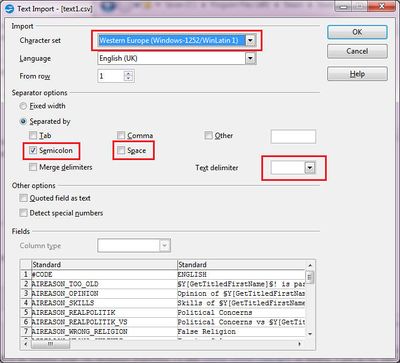
在OpenOffice Calc或LibreOffice Calc中处理本地化的一些建议:
- 导入设置:用分号分隔,无文本分隔符,ISO-8859-1 或 Western 1252/Latin 1 编码。
- Use Right-click/Column Width... 设置合适的宽度,使可翻译的语言同时可见,以避免横向滚动。
- Use Right-click/Format Cells... -> Alignment tab -> Wrap text automatically 对于正在学习的语言来说,始终能看到完整文本。
- 确保所有 x 都对齐在同一列(如果使用原版列数则是 O 列),否则文件末尾的空行可能会被移除。
- Check spelling per column (one language at a time).
- 确保文本不含分号,否则游戏中会被截断,重新导入时会显示为多列。
- When saving, use current format.
Command line
可以使用OpenOffice或LibreOffice文档极为薄弱的命令行功能,创建批处理文件,自动将.ods电子表格文件转换为分号分隔的.csv文件。 你可以将任意.ods文件拖拽到该批处理文件中,它会自动在父目录中转换为.csv文件。
如果使用 LibreOffice,将以下命令复制粘贴到一个空白文本文件中,并将该文件重命名为“update_file.cmd”(当然也可以用你选择的其他名字,只要保留 .cmd 扩展名):
::Just drag and drop the .ods file onto this batch file to export it.  Much more convenient than going through the Export menu in LibreOffice!

"C:\Program Files\LibreOffice\program\soffice.exe" --convert-to csv:"Text - txt - csv (StarCalc)":59,34,1,1,2/2/2/2/2/2/2/2/2/2/2/2/2/2/2 --outdir .. %1
同一个命令行可以与OpenOffice兼容,但文件路径会相应调整,因为两个产品都来自共享的代码库。 同一命令行在 Linux 和 Mac 安装的 LibreOffice 上也同样工作,唯一不同的是文件路径和“%1”参数需要更改以适应操作系统。
The gobbledegook in the command line parameter is documented here, but here is a breakdown:
| "C:\Program Files\LibreOffice\program\soffice.exe" | OpenOffice 或 LibreOffice 二进制文件的绝对路径。 使用绝对路径可以让你从任意文件夹中执行命令。 |
| --convert-to csv: | 表示我们想启动一个无头客户端,运行转换为.csv格式的客户端。 |
| "Text - txt - csv (StarCalc)": | Using the CSV filter. |
| 59,34,1,1,2/2/2/2/2/2/2/2/2/2/2/2/2/2/2 | In order from left to right:
|
| --outdir .. | 将文件导出到离系统根节点更近一级的目录。 |
| %1 | 将丢弃在批处理文件上的绝对文件名传递给命令行。 |
这允许你直接在“/”的子文件夹中使用.ods格式(或其他有效的电子表格格式)工作。modname/localisation" folder such as "/modname/localisation/src“,这意味着你可以利用电子表格软件隐藏无关列、启用单词换装、使用单元格格式、分配列宽、设置最佳行高度等功能,而无需在文件菜单中通过”保存副本“系统对话框来保存为.csv。
It is also possible to change the --outdir .. (two periods) to --outdir . (one period) to export to the same directory.
这里有使用Windows NT批处理脚本的多文件变体,但请注意:
::Note that this is very unreliable, for some reason, probably "because Windows".  LibreOffice will enqueue about a dozen or so conversion operations in seemingly random order, and then end.

::To convert all the files, you will have to run this batch file multiple times, or drag and drop each one to update_file.cmd instead.

for %f in (*.ods) do "C:\Program Files\LibreOffice\program\soffice.exe" --convert-to csv:"Text - txt - csv (StarCalc)":59,34,1,1,2/2/2/2/2/2/2/2/2/2/2/2/2/2/2  --outdir .. "%f"
References
| 历史 | 角色 • 家族 • 省份 • 头衔 • 剧本 |
| 脚本 | 指令 • 条件 • 作用域 • 修正 • 事件 • 决议 |
| 常规 | 定义 • 游戏规则 • 另类开局 • 宗教 • 文化 • 政体 • 特质 • 血脉 • 科技 • 法律 • 建筑 • 宣战理由 • 朝贡国 • 单位 • 目标 • 疾病 • 死亡 • 荣誉头衔 • 社团 • 宝物 • 地图外政权 • 内阁成员 • 贸易路线 • 继承 • 奇观 • 称号 |
| 图像/音效/本地化 | 地图 • 图形 • 盾徽 • 肖像 • 界面 • 小地图 • 音乐 • 本地化 |
| 其他 | 故障排除 • 验证器 • 控制台指令 • 编辑游戏存档 • Steam创意工坊 • EU4转档器模组制作 |
相关页面 (71)
CharacterChecksumCulturesDecisionEU4转档器模组制作EventEvent targetGraphics moddingModifiersObjectivesPatch 2.3Patch 2.6Patch 2.7Patch 2.8Patch 3.0ReligionsScopesSteam创意工坊TroubleshootingVariable事件模组制作作用域修正内阁成员模组制作决议模组制作剧本模组制作单位模组制作历史模组制作另类开局模组制作图形模组制作地图外政权模组制作地图模组制作头衔模组制作奇观模组制作宗教模组制作定义宝物模组制作宣战理由模组制作家族模组制作小地图模组制作建筑模组制作指令控制台指令政体模组制作故障排除文化模组制作朝贡国类型模组制作条件模组制作死亡模组制作法律模组制作游戏规则模组制作特质模组制作界面模组制作疾病模组制作目标模组制作盾徽模组制作省份模组制作社团模组制作科技模组制作